Book a free 1:1 onboarding call with the team. We'll walk through your setup live, answer your questions, and get you launch-ready. Pick a time that suits you below.
Platform setup
Branding, custom domain, templates and client dashboards — configured live on the call.
Launch plan
How to price and package your offer, and a plan for getting your first clients on.
Ask anything
Whatever is blocking you — NFC cards, integrations, migrations or the roadmap.
We run a private community for white-label partners on Skool. It's separate from this hub — the hub is your operational home; the community is where the conversation happens.
Onboarding guides
Structured walkthroughs to get your platform set up and launched.
Partner discussions
Talk positioning, pricing and sales tactics with other partners.
Founder updates
Product announcements and direct access to the team for feedback.
Eight product graphics for selling your platform under your own brand — ready for decks, social posts, landing pages and proposals. They're plain HTML files, so you can use them exactly as they are, or hand the folder to an AI assistant and have it re-skin every one of them to your brand in a single pass.
What's in the folder
All eight, at the sizes you'll get them. Click any graphic to see it full size.
Customisable profilesThree branded profiles on phones — the all-purpose hero shot.A profile in the wildA real profile framed in a browser and a phone, on a transparent background so it sits on any colour. Swap in screenshots of your own.Apple & Google WalletThe wallet pass, with both official store badges.Smart contact exchangeThe two-way exchange that captures the other person’s details too.Real-time analyticsViews, taps and saves — the reporting clients ask about.Team dashboardThe company view: every member’s card managed from one place.Your own domainProfiles served from your domain, with no trace of ours.Profile sectionsEvery section a profile can hold, exploded. Portrait — good for stories and carousels.
Two ways to use them
Use them as they are
Every graphic renders in a neutral greyscale that sits happily beside any brand. Download, drop into your deck, done — no editing, no design tools.
Or make them yours
Each graphic is a single HTML file with a brand tokens block at the top. Hand the folder to an AI assistant with the included prompt and it re-skins all eight in one pass.
How to put them on your brand
1. Download and unzip the folder
The button below downloads it straight away — no sign-in, no Drive. Keep the folder structure intact once unzipped; the graphics reference shared assets sitting alongside them.
2. Open the folder with your AI assistant
ChatGPT, Gemini and Claude all handle it. We’d point you at Claude — the kit was built with it, and it reads the folder in place rather than making you upload eight files one by one.
3. Paste the rebrand prompt
Copy it below (it also ships in the folder as REBRAND-PROMPT.md). Fill in your colour, font, logo and domain, paste it, and every graphic comes back on your brand.
See the rebrand prompt
Re-brand the landing graphics in this folder to my brand. Read README.md and manifest.json first. Only change the BRAND TOKENS block in each graphics/graphic-*.html, the logo, the wallet QR, and the profile screenshots — keep every layout and all UI structure exactly as it is.

My brand:
- Name: [name]
- Domain: [https://your-domain.com] — point the wallet QR here
- Primary colour: [#hex]
- Font: [Google Fonts family name]
- Accent pastels (3–6 soft colours from my palette): [#hex, #hex, …]
- Logo file: [path, or "keep the placeholder mark"]
- My live profile: [https://card.yourdomain.com/yourname]

Then show me each rebranded graphic.
4. Export what you need
Open a graphic’s HTML file in your browser and screenshot it. Each one is a fixed canvas, so the screenshot is the finished asset — nothing to install.
Version 2.0 · ZIP, 1.4 MB · Last updated 22 August 2026
Example Profiles
Ten example profiles built on the live platform to show the range: light and dark, classic and liquid glass, locked and open contact details. Open any of them on your phone in a demo and tap around.
The people and businesses on these profiles are illustrative, built by us to show the product. The pages themselves are live and behave exactly as your clients' would.
A note before you share them. These profiles live on our core platform at swft.id, not on your white label. If you'd rather your clients didn't see Swft Connect behind your brand, we'd advise showing them these yourself rather than sending the links on directly.
Pricing
Your plan is one flat platform fee with unlimited users — you're never charged per seat.
On a custom or marketplace plan? Your pricing may differ from the above — contact us if you're unsure what applies to your account.
NFC Cards
NFC cards are physical cards with an embedded chip. Tapped against a smartphone, they instantly open a digital profile — no app, no friction. Cards give your offering a tangible element clients hold and use every day. The result: higher perceived value, lower churn, and new revenue through upsells and bundles.
How every card works
Three steps, whether we produce your cards or you print your own.
1
Generate your card links
Create a batch of unique reference links in your dashboard, or we supply them to you as a CSV. One link per card.
2
Get your cards made
Order the cards from us or use your own printer. Each card carries one link from the batch, printed as a QR code and encoded in the chip.
3
Link each card to a user
Assign the card to a user from your dashboard, or let them do it themselves: the first tap opens a branded page where they claim it in a click.
Two ways to get cards
Both routes end with the same card in your client's hand. The only difference is who produces it.
We supply the cards
Pick a material, send the design, and we produce, encode and ship worldwide. To your door or direct to your client, with no minimum order.
First tap opens a branded claim page on your platform
We Supply the Cards
The hands-off route. We produce the cards, encode them for your platform and ship worldwide, to your door or direct to your clients. No minimum order.
How ordering works
Step 1
Design the card
You or your client design it at nfcdesigner.com — it generates a design link you'll use when ordering. Prefer your own artwork? Print-ready files are accepted via our template.
Step 2
Place the order
Pick the card type in the shop, set the quantity and paste the design link. No minimum order — and pricing tiers apply across your whole cart.
Step 3
Choose shipping
Both options are available in the same cart — each item can go to a different address.
Ship to youAll cards to your address — you distribute to clients yourself.
Direct to clientStraight to your client's door. Unbranded packaging by default.
Step 4
Client taps to activate
The first scan lands on a branded page on your platform — they create a profile, log in, or link instantly in one click. No manual setup on your end.
1–9 cards up to 5 days production
10–50 7–10 days
50+ 2–4 weeks
Worldwide shipping · tracking on dispatch
Before you order: confirm your app domain is correct. It's encoded into every card at production and cannot be changed once printed. Pricing tiers apply across your whole cart — batching multiple client orders keeps unit costs down. Full guide: order guide.
The range
PVC
The entry-level card. Light, durable, full-colour print.
The sample pack includes 9 cards across plastic, bamboo and metal — useful for demos, client showcases, or recording short videos. All wholesale ordering and pricing lives in the partner portal.
Supply Your Own Cards
For partners with their own printer, card supplier or existing stock. You produce the cards, your platform provides the link each one carries, and encoding takes a free app on any phone. Four steps, start to finish.
1
Get your card links
Generate a batch of unique reference links in your dashboard, or request them from us and we will send a CSV. One link per card.
2
Print a QR on each card
Each link goes on that card's artwork as a QR code. Your printer just prints it, and it doubles as the backup for phones without NFC.
3
Encode each chip
Open the free NFC Tools app, scan the card's QR code to pick up its link, then write it to the chip. No special hardware, just a phone.
4
Hand it to your client
Assign the card to them from your dashboard, or let them claim it themselves: the first tap opens your branded activation page. Every tap after opens their profile.
Why cards carry a link, not a profile address
Change where any card points, at any time, from the dashboard. Reassign it when someone leaves, or redirect it entirely. The card in their pocket keeps working.
Encode a profile address straight onto the chip instead, and the day that address changes, every card pointing at it is dead plastic.
What you need
The app
NFC Tools, free on iOS and Android
The chips
NTAG213, 215 or 216. All three work, and both iPhone and Android read them
From your printer
Nothing extra. The QR code is part of the artwork
From your clients
Nothing to install. Cards open in the browser
Prefer us to handle the links? Request a batch below and we'll send them over as a CSV, usually within one working day.
Roadmap
Features and improvements specific to the white label partner programme. For the general platform, see the public roadmap.
v1.3Plans builder with feature togglesIn progress
Create your own plans for individuals and companies, with pricing and features toggled on and off per plan. You decide what each tier of your offering includes.
v1.3NFC module for your own supply chain/paper cardsIn progress
A reference link module for generating links for NFC cards, QR codes, redirect links and more. Point each link anywhere, change the destination at any time, and track every scan — ideal if you run your own card supply chain or print business.
v1.3Integrated payment gateway to automatically charge customersIn progress
Connect Stripe to charge clients automatically through the platform — no more off-platform invoicing.
v1.3Embedded guides for featuresIn progress
In-app guides for platform features, so your clients can help themselves without contacting you.
v1.4Update email subjects + copyNot started
Customise the subject lines and copy of every system email your platform sends.
v1.4Create user onboarding email sequenceNot started
An automated email sequence that walks new users through setting up and sharing their card.
v1.4Unique usernames for just your white label instanceNot started
Profile usernames are unique within your platform only — a client can claim a name even if it’s taken on another instance.
v1.5Create templates for clients to useNot started
Build profile templates once and offer them to any client for consistent, fast onboarding.
v1.5White label APINot started
Programmatic access to your platform — create users, manage companies and pull data into your own systems.
v1.5Bulk client uploadingNot started
Import large client lists in one go instead of adding accounts manually.
Completed — 12 features shippedv1.0Completely new dashboard for white-label adminsDone
A redesigned admin dashboard built specifically for partners. Manage all your clients, settings and branding from one place.
v1.0All system emails sent directly from your own domain, including your brandingDone
Password resets, invitations and notifications are sent from your own email domain with your branding. Swft Connect is never visible to your users.
v1.0Set your own app name, domains, logos, meta dataDone
Full control over how your platform presents itself — app name, login and profile domains, logos, favicon and SEO metadata.
v1.0Branded sign up & login pagesDone
Your clients sign up and log in on pages carrying your branding and domain, not ours.
v1.0Manage individual users as well as full companiesDone
Onboard solo users and multi-user companies side by side. Each company gets its own dashboard, and no data is shared between client systems.
v1.0Lock/unlock sign up pageDone
Choose whether anyone can self-register on your platform, or keep sign-up invite-only and add clients yourself.
v1.1Entire platform available in multi-languagesDone
The platform runs in 10+ languages, set per tenant. Additional languages are available on request.
Wholesale card ordering through the partner portal, shipped worldwide — to your address or direct to your clients.
v1.1White label dashboard with clients overviewDone
A single overview of every client account on your platform — companies, users and activity at a glance.
v1.1Move users between companiesDone
Reassign a user from one company account to another without recreating their profile.
v1.2Set a brand colour for the platform and emailsDone
Apply your brand colour across the dashboard and system emails so the whole experience matches your identity.
v1.2Landing page generatorDone
Generate a ready-made marketing landing page for your platform — a quick way to start selling without building a site first.
FAQs
How much should I charge my clients?
Many partners offer digital cards low-cost or free as the ultimate foot-in-the-door — an easy, high-wow-factor sell that opens the door to higher-ticket services. Sold standalone, the market rate for a comparable feature set is $5–$10/user/month: self-serve clients typically land at $5–7, managed-service clients at $10+. Once you manage a client’s cards, it becomes a sticky product they rarely cancel.
Who can I offer digital business cards to?
Any type of business — solo entrepreneurs, small teams, or large enterprises, across local businesses, professional services, tech, real estate, retail and hospitality, events, healthcare, education and nonprofits. Cards can be branded and customised for any industry.
How can I charge my clients for the platform?
Partners bill their clients off-platform today — bolt digital card fees onto existing invoices or set up a separate billing arrangement. In-platform billing is coming in 2026.
Will Swft Connect branding be visible anywhere?
No! Not a single place. It’ll be entirely your system.
Can I customise the platform branding for each client?
Yes. Each client can have their own dashboard, domain, branding and more. No data is shared between client systems.
Will my clients be able to use the live chat?
No. Users under white label will not see our support chat or documentation. See the Support section for how support works.
Can I integrate with my clients’ CRM?
Yes. CRM integrations are live: Salesforce, HubSpot, GoHighLevel, Dynamics 365, Zapier and Webhooks. Usage-based pricing may apply beyond an included allowance — contact us for details.
What languages is the platform available in?
The platform supports 10+ languages today. Any additional language is available on request via the language request form.
How quickly can I launch?
Your branded platform can be live the same day.
Is the platform secure?
Yes. The infrastructure is independently audited and penetration tested, with 24/7 security monitoring and organisation-level data isolation across all tenants.
What happens if I close my partner account?
Your branded platform and all associated client accounts are deactivated. We recommend exporting client data before cancellation.
Support & Feedback
Support runs on a two-tier model. You provide first-line support to your clients — they never see Swft Connect branding, documentation or chat. We provide second-line support to you.
First line — you to your clients
End users contact you directly. If there's a bug, gather the details and report it to us to resolve on your behalf.
Second line — us to you
Chat widget in your Swft Connect dashboard (partners only) or support@swftconnect.com. Same business day response, UK hours (10am–6pm, Mon–Fri).
Recommended for user bugs: sign up to jam.dev and create a recording link. Send it to users who hit bugs — forward us the jam link and we'll resolve the issue on your behalf.
Legal
The documents that govern the white label partner programme.
Non-exclusive reseller rights with full rebranding and your own client pricing. No minimum commitment — either party may terminate with 30 days’ notice.
UK GDPR compliant, no external trackers. For data captured through your branded platform, you act as data controller and Swft as processor — a DPA is available on request.
AES-256 at rest, TLS 1.3 in transit, UK/London hosting. Independently audited and penetration tested, with 24/7 security monitoring.
By enrolling in the Swft Connect White Label Programme, you acknowledge and agree to all applicable legal terms and partner agreements. Your continued participation constitutes acceptance of these terms.
Need help with anything?
Sign in to the app and use the live chat, or submit a ticket.
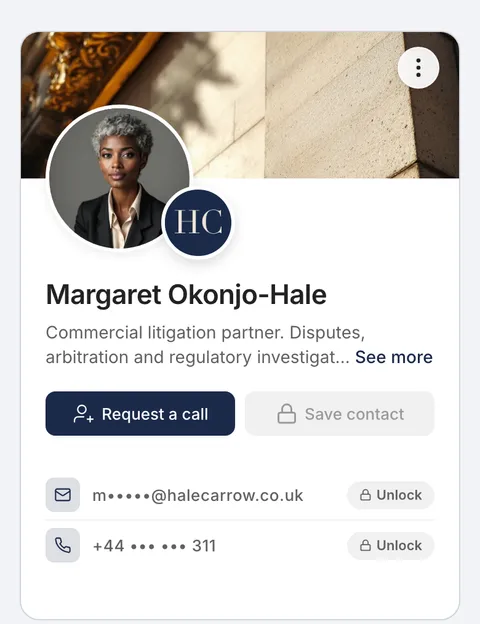 Margaret Okonjo-Hale Litigation partner, Hale Carrow LLP, London Open profile
 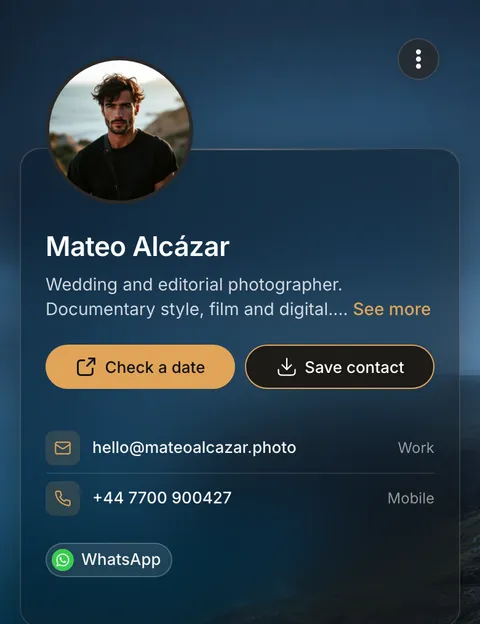 Mateo Alcázar Wedding and editorial photographer, Bristol Open profile
 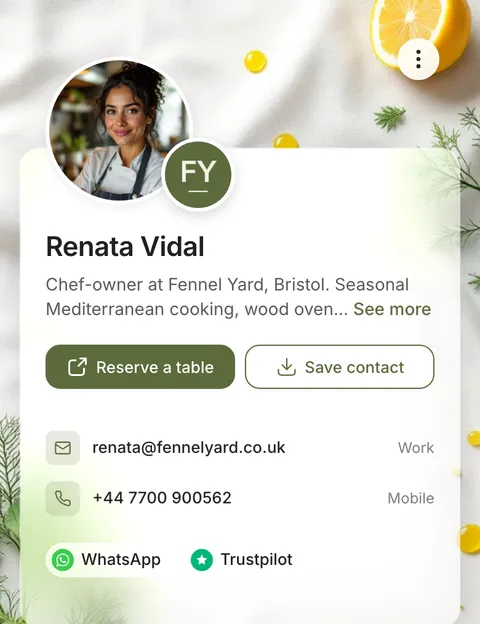 Renata Vidal Chef-owner, Fennel Yard, Bristol Open profile
 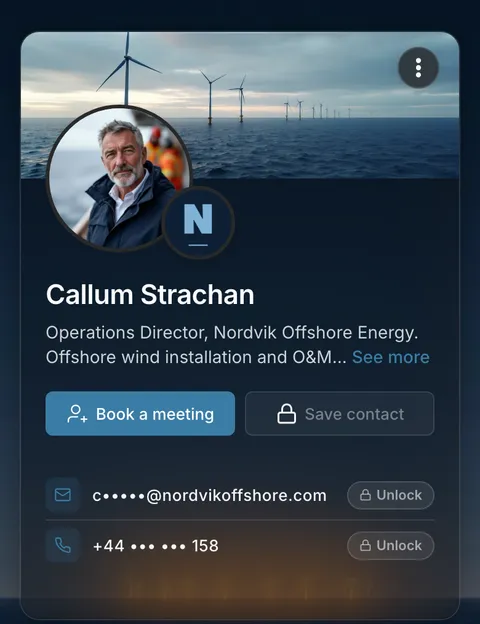 Callum Strachan Operations director, Nordvik Offshore Energy, Aberdeen Open profile
 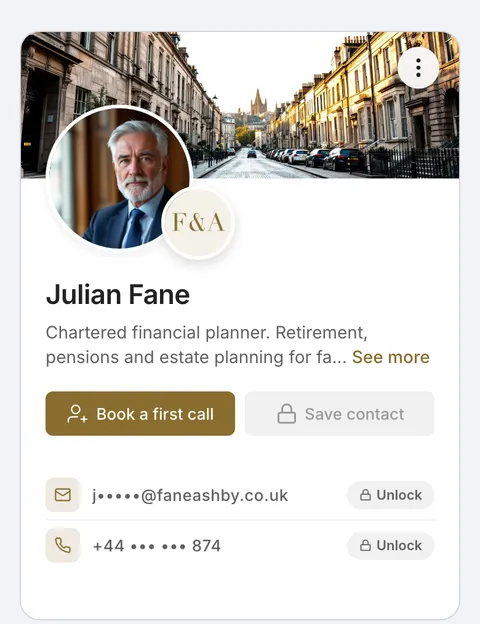 Julian Fane Chartered financial planner, Fane & Ashby, Edinburgh Open profile
 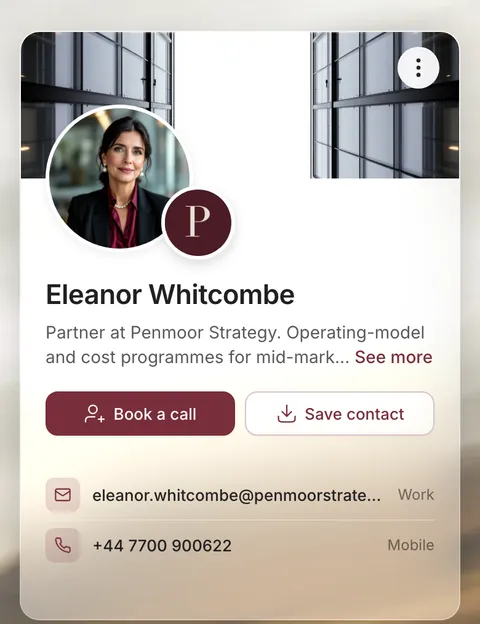 Eleanor Whitcombe Partner, Penmoor Strategy, London Open profile
 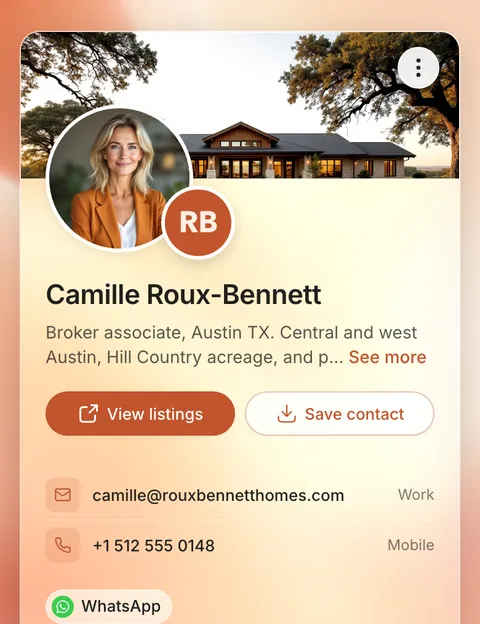 Camille Roux-Bennett Broker associate, Roux Bennett Homes, Austin Open profile
 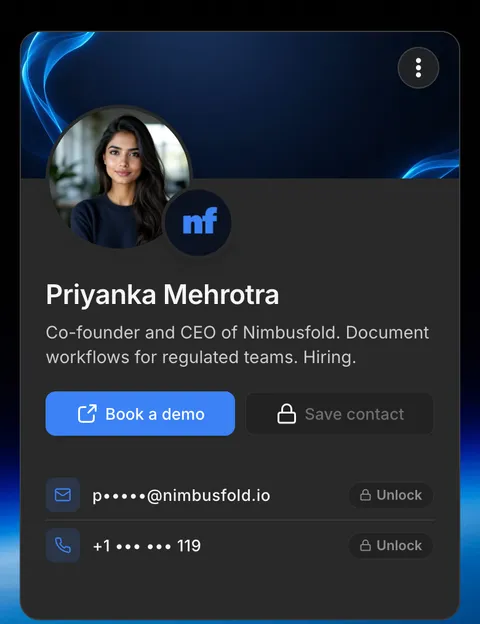 Priyanka Mehrotra Co-founder and CEO, Nimbusfold Open profile
 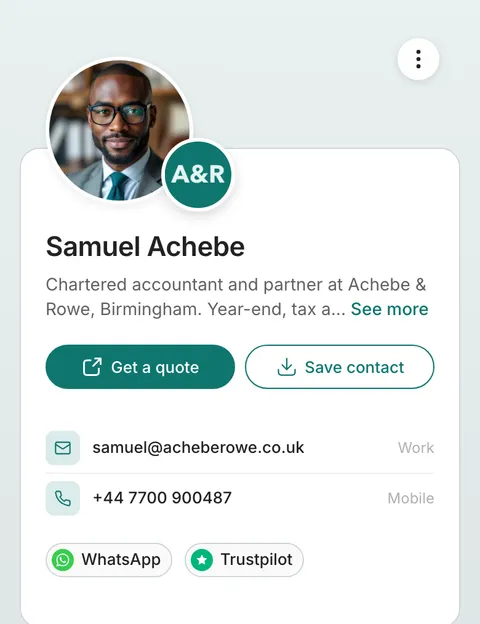 Samuel Achebe Chartered accountant, Achebe & Rowe, Birmingham Open profile
 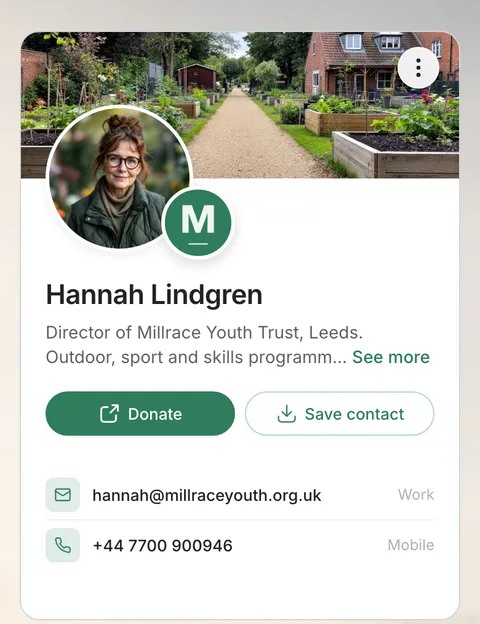 Hannah Lindgren Director, Millrace Youth Trust, Leeds Open profile